One Take: How eclipseClick Keeps Shooting When Things Go Wrong
Totality runs from a few seconds to over six minutes — August 2027 gives you 6m 23s at its best. Bailey's beads and the diamond ring get a few seconds each, at both ends. Long enough to shoot properly. Nowhere near long enough to troubleshoot. Every mechanism in this post exists for one reason: so you spend those minutes looking up, not down at a laptop.
The Failure Modes Are Boring
You have spent months planning this. You have driven, flown, or argued with a rental car company to be standing on this particular patch of ground. And what threatens the whole thing is not some exotic astronomical surprise — it is the dullest catalogue in computing:
- A USB cable gets nudged by a tripod leg.
- A battery gives out three minutes before second contact.
- Someone bumps the table and the laptop lid drops.
- The machine decides now is a good time to finish an update.
- Your camera's driver has a bad moment and stops answering.
Any one of these ends a run in most capture software. The sequence stops — or worse, it keeps going but shifted, every remaining frame firing at the wrong moment, and you don't find out until you are home with a folder full of near-misses. Ten seconds of trouble at 40% partial phase is an inconvenience. The same ten seconds at second contact is the eclipse.
eclipseClick is built around a different assumption: interruptions will happen, and the job of the software is to make each one cost only what physically happened during it. Everything else — the scheduler, the recovery tiers, the process architecture — follows from taking that sentence seriously. This post is the engineering behind it, and the screenshots are from rehearsal runs with the hardware failing on purpose.
Why any of this got built
I have stood under two total eclipses with a camera automated by software. Oregon in 2017 taught me the learning curve the hard way — missed frames, late shots, focus drift. By Mazatlán in 2024 I was far better prepared, and the captures were far better. What stayed with me was not the photographs. It was the stress: the countless practice runs, the hours of anxiety on the morning of, no way to tell whether a shot had fired early or late or by how much, USB disconnects that were not handled gracefully, and the knowledge that a crash meant restarting, reconnecting everything by hand, and setting the eclipse up all over again — with the moon already moving.
Somewhere inside those four minutes of totality I made a decision: let go of the laptop and be present with my family. I am glad I did. But I kept coming back to one thought afterwards — it should not have to be a trade.
That is the prime reason eclipseClick exists: to maximise the probability that the photographer spends totality watching the eclipse rather than troubleshooting it.
Not fewer bugs as an abstract virtue. A specific outcome: your eyes on the corona and on the people next to you, while the software handles the eclipse it already knows about. Everything below is what that goal costs in engineering. The longer version of the story is in Why I Built eclipseClick.
1. Anchored to the Sky, Not to a Stopwatch
This is the decision every other one rests on — and it is the one that separates eclipseClick from everything else in this category. Other capture software runs a sequence. eclipseClick runs the sky.
Every capture in eclipseClick is scheduled against an absolute instant, computed from your location's contact times. Not "half a second after the previous frame." Not "step nine of the sequence." Each frame knows exactly when it is supposed to happen in real time — and that answer is re-derived from the current clock every time the schedule is touched.
It sounds like a technicality. It is the entire difference between a run that survives trouble and one that doesn't. A step-based scheduler cannot recover from an interruption, because it has no idea what the sky was doing while it was down — the best it can offer is to carry on and be wrong by exactly the length of the problem, forever.
Because timings are absolute, there is no such thing as "resuming where we left off." There is only re-entering the timeline at the current moment. Every recovery path in the app is the same three steps: notice the problem, get the hardware back, rejoin the schedule. Anything that came due while you were down is skipped deliberately — with the reason and the amount of lateness written down — and the next frame fires at the moment the sun actually reaches that point in the eclipse.
Your schedule cannot be moved out from under you
When a run starts it is pinned to a steady timebase. If your system clock gets corrected mid-eclipse — routine on a machine that has been offline and suddenly finds a signal — your captures do not shift. eclipseClick notices the clocks have diverged, tells you, and keeps firing against the timebase your contact times were computed on.
The last stretch isn't left to a timer
Ordinary software timers are approximate, and they are especially approximate on a busy machine. For the final approach to each frame eclipseClick tightens onto the exact target instant and fires at or after it — never early.
2. A Disconnect Is an Event, Not an Ending
The instinctive response to a camera dropping off the bus is to pause the run and wait for it.
That is exactly wrong, and eclipseClick deliberately refuses to do it. Because frames are pinned to celestial time, pausing converts recoverable shots into guaranteed misses: stop the clock over a two-second cable blip and you have turned it into "everything from here is wrong." The sun does not wait for your USB port.
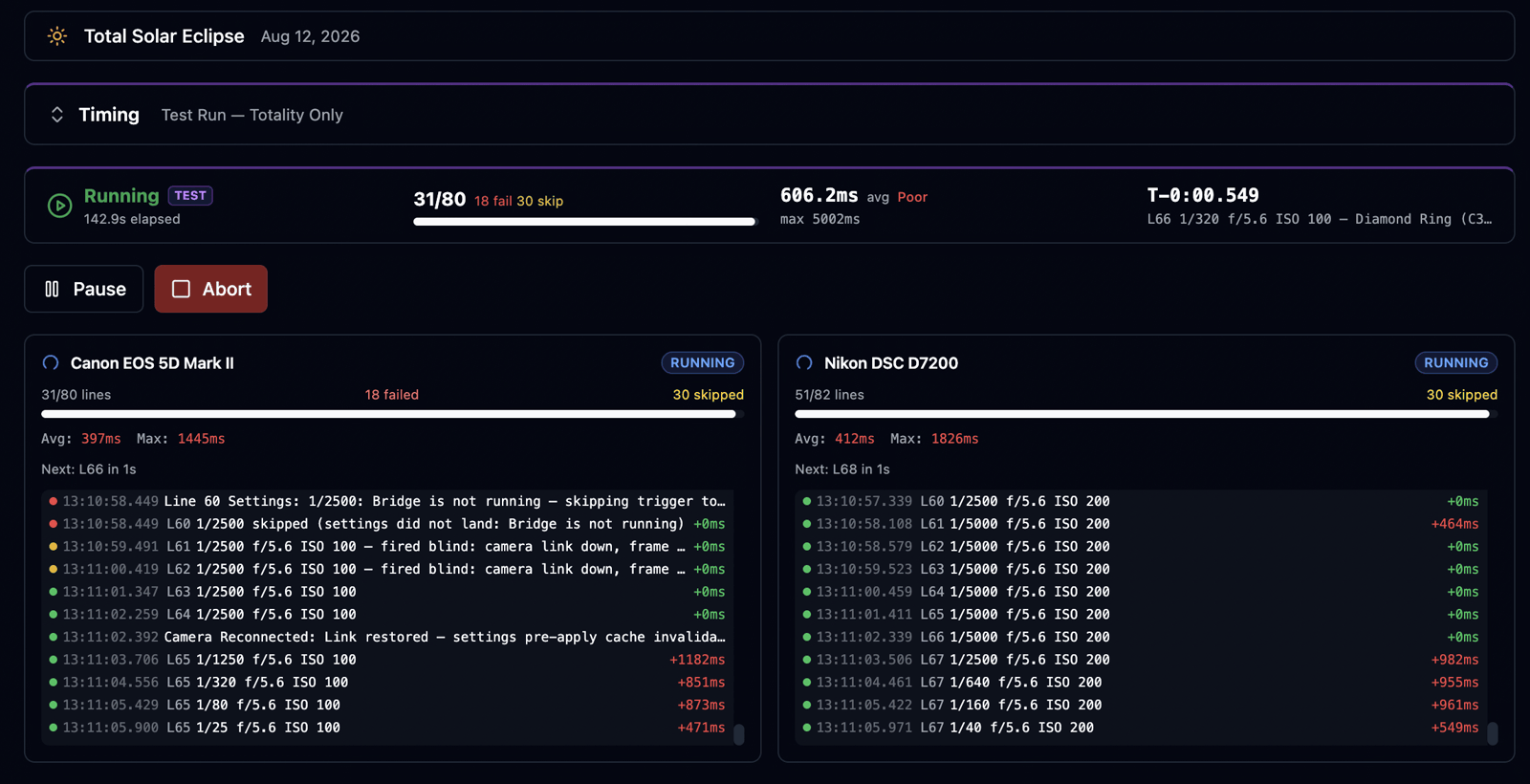
That last point is the one that separates software that "reconnects" from software that actually recovers. When the link returns, eclipseClick stops trusting the camera's state. The next frame writes its shutter, aperture and ISO explicitly instead of assuming the body is still holding them. A run that reconnects and then quietly shoots at the wrong exposure is not a recovered run.
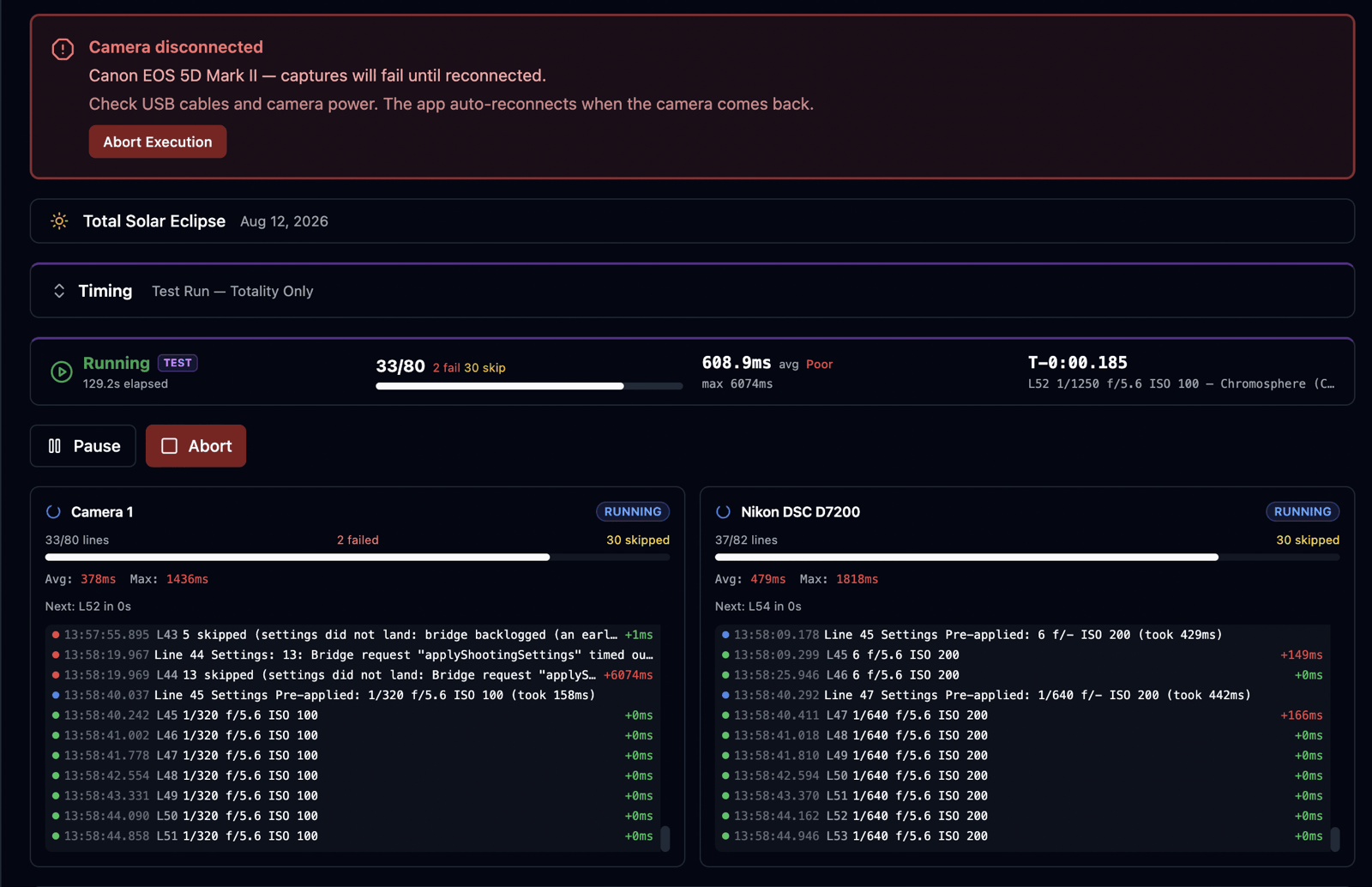
About these screenshots. Every one of them carries a TEST badge and reads Test Run — Totality Only: dress rehearsals against the 12 August 2026 eclipse, run on real Canon and Nikon bodies with the links deliberately broken mid-totality. That is the point. Anyone can screenshot a run where nothing goes wrong. These are the runs where things did.
One honest caveat, because you deserve the real picture: the case that costs more than a clean disconnect is a camera that hangs — one that accepts a command and never answers. Captures on a given camera happen one at a time, so a hung one can delay the frames queued behind it. They fire late and are recorded as late, rather than vanishing quietly. This is precisely why hangs are hunted rather than waited out: a link that has stopped answering is torn down and rebuilt instead of being allowed to sit on your shutter.
3. Battery Swaps: the One That's Easy to Get Wrong
A battery swap is not the same problem as a cable re-plug, and software that treats them identically fails here. When you pull the battery, the body powers down completely, comes back as a new device as far as the computer is concerned, and — critically — forgets the remote-control state your script depends on. Reconnecting is not enough. The camera has to be put back into the mode it was in.
It re-identifies the actual camera — looking for the specific body it was working with, rather than reusing a handle that no longer means anything.
It re-arms remote-control mode. Every reconnect path re-establishes it explicitly. The app never assumes a body kept its state across a power cycle — that assumption is exactly what produces a run that reports "reconnected" and then silently fails to fire.
It re-applies your exposure settings, because after a power cycle what the camera is holding is anyone's guess.
Swap a battery during the partial phase and the run picks the camera back up and carries on. Swap one during totality and you lose the frames in the gap — but everything after it is intact and on time.
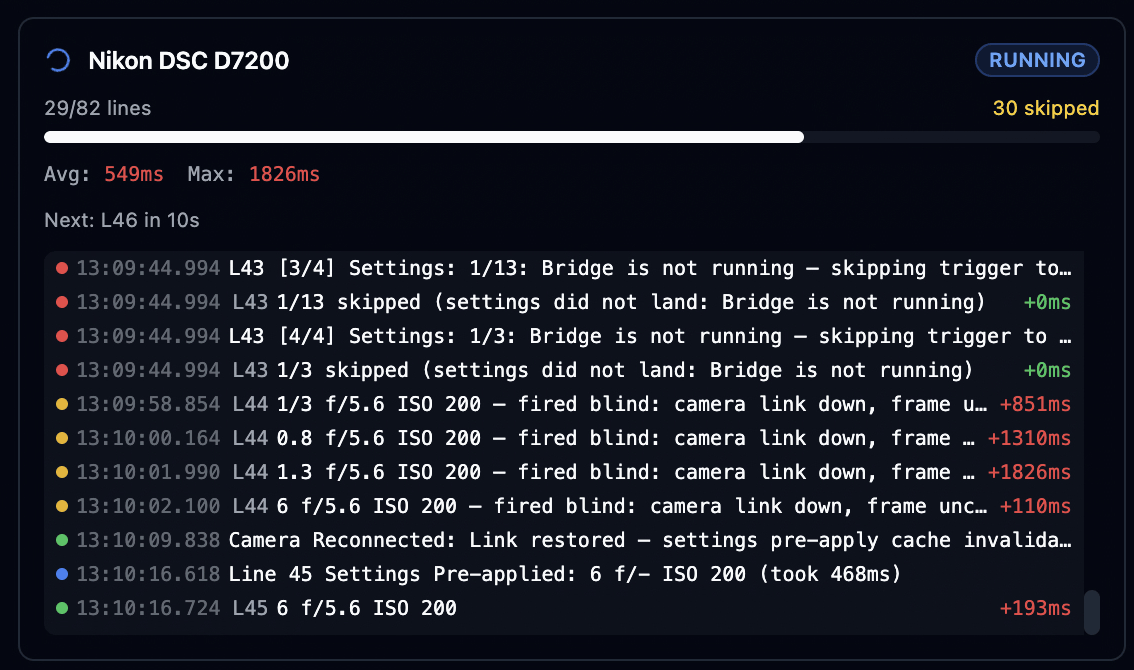
4. Four Tiers of Recovery, Escalating Only as Far as Needed
Camera connections fail in more ways than "unplugged," so recovery is layered. The cheapest layer that can fix the problem handles it; escalation happens only when the layer below reports no.
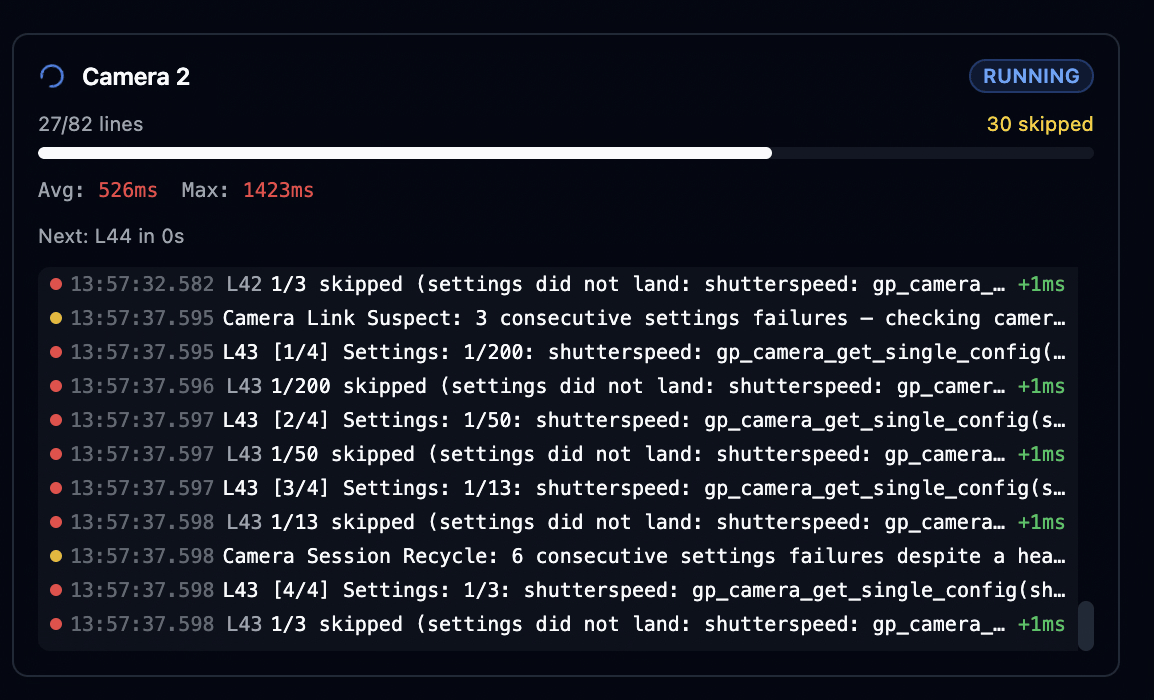
Throughout all of this, no request is ever left dangling. Anything in flight when a connection dies is failed immediately, so a dead link can never silently stall your schedule while frames tick past.
One deliberate trade, stated plainly
While a script is armed or running, eclipseClick switches off its background health polling. The USB bus stays quiet for the only traffic that matters — your captures. During a run, problems are detected from the camera's own disconnect events and from capture failures. Poll chatter competing with a totality bracket is a worse failure than a few seconds of slower detection.
5. The Window Is Not the App
In most capture software, the window is the app: close it, crash it, or watch it freeze while the operating system decides it is unresponsive, and your run dies with it. In eclipseClick, a crashed window is not a stopped run.
Your execution does not live in the window you are looking at — the window is a view of it. The schedule, the run clock and the camera links all live in a separate process that has no interface to draw and no user to be surprised by. If the interface throws an error, it is caught, the details are written to the log file for support (no developer tools required), and you are offered a reload. When it comes back, it re-reads the entire run: current state, every camera's log, every frame result, your position on the timeline.
6. The Sturdiest Trigger Path in the App
If you shoot with a DSUSB-style shutter cable, recovery is faster still, because the reconnect attempt lives inside the act of firing. If the device is not there when a frame comes due, eclipseClick reconnects and fires in the same call. A background check watches for the adapter disappearing and reconnects the moment it is plugged back in — resetting the relays when it does, so you never come back to a latched shutter.
For setups where the camera's own SDK is the fragile part, this is the most robust way to trigger, and eclipseClick lets you mix approaches: settings over the SDK, shutter over the cable.
7. Designed Disconnected, With GPS as the Timebase
eclipseClick is designed to run completely disconnected. Not "degrades gracefully offline" — disconnected is the expected state, because the best seat on the centreline is usually a field with no bars on it.
Eclipse predictions, lunar limb profiles, contact times and exposure planning are all computed on your machine. No service call, no API key, no "please connect to continue." Map tiles for your region are downloaded while you are still planning and served from the local cache from then on, so the map works the same on the centreline as it did at home.
Time comes from a connected GPS receiver, and in the field that is the right answer for the same reason the rest of this post exists: a network time source you cannot reach is worse than useless, and a laptop's own clock drifts. GPS gives you time disciplined to the satellites themselves — no infrastructure, no dependency, no assumptions. Which is exactly what you want when every capture is anchored to an absolute instant. If GPS is unavailable the app says so plainly and runs on system time rather than refusing to start, but GPS is the intended configuration, not a bonus feature.
You can be a hundred miles from the nearest bar of signal and the software behaves exactly as it did on your kitchen table.
8. Several Cameras, Isolated Failures
Arming is all-or-nothing on purpose: if any camera cannot arm, you find out before the eclipse, while there is still time to fix it.
Once running, every camera is independent — its own schedule, its own recovery, its own log. A failing connection on camera two triggers camera two's recovery and touches nothing else. Your contact-time markers and audio cues are scheduled independently of any camera and keep firing regardless, so even in a worst case you are still being told what the sky is doing.
9. Failing Loudly on the Ground, Not Silently in the Dark
Some limits cannot be engineered away. They can only be surfaced early.
A few camera connection paths — typically the fallback drivers used when a manufacturer's own SDK will not see the body — cannot sustain rapid-fire sequences. eclipseClick does not discover this at second contact. It refuses to arm a script that would hit the limit, explains why, and tells you what to change. That includes the subtle version: not just an obvious burst, but several individual frames spaced closely enough to become one. We wrote up one of those cases in detail in Defense in Depth for Sony Eclipse Bracket Scripts.
The same philosophy drives the pre-eclipse checklist and the dress-rehearsal workflow. Test runs are tracked, so the app knows whether you have actually rehearsed recently rather than taking your word for it, and every skipped or failed frame in a rehearsal is written down with its reason. The goal is that on eclipse day, nothing about your setup is a surprise.
10. Restarts: Exactly What You Get
Every frame — captured, failed or skipped — is recorded locally as it happens, with what it was scheduled for, when it actually fired, and how far off it was. A crash or an unexpected quit does not cost you that record.
So after an unplanned restart mid-eclipse, everything needed to pick the run back up is still there: your script, the eclipse timings, and a complete record of what already fired. You reconnect the camera and re-arm — seconds of work — and because scheduling is absolute, everything that came due while you were rebooting is skipped automatically, with reasons logged, and the run rejoins the timeline at the correct place. Nothing shifts. Nothing double-fires.
That is a materially different outcome from "start the sequence again and hope," which is what a step-based scheduler leaves you with.
11. What a Run Survives
| Something goes wrong | What it costs you |
|---|---|
| Cable nudged, link drops briefly | Only the frames inside the gap. Remote-control mode and exposure settings are re-established, not assumed. |
| Camera fully off the bus | The frames until it is found. A search runs about once a second for dozens of attempts. |
| Battery swap mid-run | The frames during the swap. The body is re-identified and re-armed on the far side. |
| Camera driver crashes or hangs | The frames during the rebuild. Hangs are detected rather than waited out. |
| System clock corrected mid-eclipse | Nothing. Captures stay on the timebase your contact times were computed on, and you are told the clocks diverged. |
| Interface crashes or is reloaded | Nothing. The engine keeps shooting; the window rehydrates. |
| No signal, no network, no cell service | Nothing. Disconnected is the design target, with GPS as the timebase. |
| One camera fails in a multi-camera run | That camera's frames only. The others never learn about it. |
| Machine restarts mid-eclipse | The frames during the reboot. Reconnect and re-arm; past-due frames skip themselves and the rest run on time. |
Notice the pattern: the cost is always the frames that physically could not be taken. Never the rest of the eclipse. Every row in that second column is short for the same underlying reason — nothing in this app is scheduled relative to anything else, so there is no mechanism by which a problem can outlive itself.
12. Why Nothing Else Comes Close
We will say it plainly, because we believe it and because the engineering above is why: no other eclipse capture software is built to survive eclipse day the way eclipseClick is.
Not "has more features." Not "has a nicer interface." Reliability specifically — the property that decides whether months of planning turn into photographs. Automating a camera is the easy part; plenty of software can fire a shutter on a schedule when everything works. The field thins out fast at the hard part: what happens when the hardware, the operating system or the driver stops cooperating with ninety seconds left on the clock. So rather than a vague superlative, here are the specific claims we will stand behind — every one of them checkable, and every one of them demonstrated above:
- Every frame is scheduled against an absolute celestial instant — not a step in a sequence — so an interruption is never contagious.
- The run clock cannot be moved out from under you. A system clock correction arriving mid-eclipse shifts nothing, and you are told it happened.
- Four escalating tiers of camera recovery, none of which stop to ask permission, plus reconnect inside the trigger itself on the shutter-cable path.
- Remote-control state and exposure are re-established after every recovery, never assumed — which is the difference between "reconnected" and actually recovered.
- The execution engine outlives its own user interface. Crash the window mid-totality and the captures keep going.
- Scripts the hardware cannot execute are refused at arm time — loudly, on the ground, with the fix named.
- Complete disconnection is the design target, with a GPS-disciplined timebase. No network, no service, no API key, no exceptions.
- Every frame is accounted for — fired, failed or skipped — with its intended instant, its actual instant, and the reason, written down as it happens.
That list is the standard we think eclipse software should be held to. Take it to any other package you are considering and ask which of the eight it can make.
And we publish the engineering. This blog carries the postmortems — the four-second timing bug, the two-stop exposure error, the five macOS SDK bugs — including the ones we caused. Software you are going to trust with a once-in-a-decade event should be willing to show you where it has been wrong before. Judge the claim on the evidence.
Where a limit is real, this post names it: frames inside a gap are gone, a hung camera can delay the frames behind it, and a restart needs you to reconnect and re-arm. We would rather tell you exactly where the line is than let you find it at C2.
13. The Real Measure: Eyes Up, Not Down
Reliability is not the goal. It is the means. The goal is the number of seconds you spend looking at a screen while the corona is out — and the target for that number is zero.
Read the whole post again with that lens and the design choices stop looking like separate features:
- Recovery never asks permission. Nothing waits behind a dialog box for a click. A camera that drops off the bus is hunted, reconnected and re-armed while you are still looking at the sky — because a prompt that needs answering during totality is the same thing as a failure.
- An interruption is never contagious. Absolute scheduling means you do not have to intervene to keep the rest of the run correct. There is nothing to fix by hand mid-eclipse, which is precisely why there is no reason to be at the keyboard.
- Cues reach your ears, not your eyes. Contact markers and audio cues are scheduled independently of any camera, so you are told what the sky is doing without looking away from it.
- Diagnosis is for afterwards. Every frame's schedule, actual fire time and timing error is written down as it happens. That record exists so you can read it over dinner — not so you can debug at C2.
- Surprises are moved to your kitchen table. Simulation and dress-rehearsal runs, the pre-eclipse checklist, and an arm-time refusal to accept a script the hardware cannot execute all exist to relocate every discoverable problem to a week earlier.
- The interface is expendable. The engine keeps shooting whether or not the window — or your attention — is on it.

The honest version: eclipseClick cannot promise you will never touch the laptop. It can promise that the situations requiring you to are rare, named in advance, and small — and that when one happens, the cost is a few frames rather than the eclipse.
The best review this software could get is not "it captured 214 frames." It is "I forgot it was running." That is what it was built for, and it is why every failure mode in this post got engineered against instead of documented as a caveat.
Bring software that expects things to go wrong
Download eclipseClick, run a dress rehearsal this week, and unplug a cable on purpose to watch it recover.